Are tech-support popups and renewal invoices a scam?
Short answer: yes, in both of their common forms. A browser popup claiming your computer is infected and showing a support number, and an email invoice claiming an antivirus or tech-support subscription (often “Geek Squad” or a well-known antivirus brand) just renewed for a large amount, are two versions of the same scam: get you to call a fake support line.
What do tech-support scam popups and invoices look like?
The popup version: while browsing, a full-screen popup appears, often with a loud warning sound, claiming your computer is infected with viruses or that Microsoft or Apple has detected suspicious activity. It displays a phone number to call for “immediate support” and may lock your browser in a loop that makes it hard to close the tab.
The invoice version: an email arrives that looks like a receipt, saying a service (commonly styled after Geek Squad, Norton, McAfee, or a similar brand) just auto-renewed your subscription for several hundred dollars. It includes a phone number to call if you did not authorize the charge or want to cancel.
In both cases, calling the number connects you to someone posing as tech support, who asks you to install remote-access software so they can “fix the problem” or “process the refund.” Once they have that access, they can view your files, install malware, or walk you through logging into your bank account under the guise of a refund.
See an example
This is illustrative, not a subscriber submission: we ran a message written to match this scam's real-world pattern through our current system, and these are real excerpts from that check, cropped to the parts that matter, not the full text. For a real reply we actually sent, under our earlier format, switch to the other tab.
Subject: Your Geek Squad subscription has been renewed - $499.99
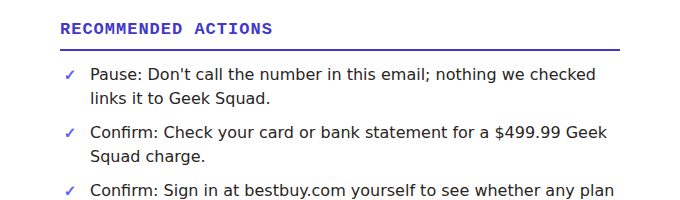
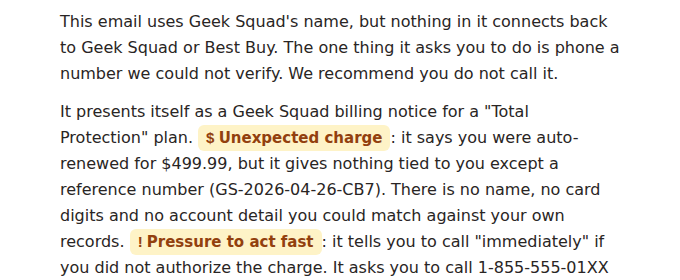
This is the reply we actually sent, quoted as it went out. It was assessed under our earlier verdict format, so it opens with a verdict word. Reports now open with the recommended actions and name what we found beneath them, with no verdict word. We never rewrite an assessment we have already delivered.
Verdict: SCAM
A user forwarded an email styled as a Geek Squad renewal receipt for $399, with a phone number to call to dispute the charge. There was no matching subscription on the user's actual account with the real company, and the sender's email address had no connection to the real brand.
Genuine renewal receipts do not need to be disputed by calling a number embedded in the email itself. A real account and charge history is always checkable by logging into the company's real site directly. The embedded “dispute this charge” number is the scam's entire mechanism.
Why does the tech-support scam work?
Both versions manufacture a problem you did not have (an infection, an unwanted charge) and then offer the solution in the same message: call this number. That collapses the natural verification step of looking up support contact information yourself. The invoice version adds a second layer: a large, unexpected dollar amount creates urgency to call and dispute it immediately, which is exactly the rushed state a scammer wants you in before asking for remote access.
By the numbers: adults 60 and older reported $175 million in tech-support scam losses in a single year, and are five times more likely than younger adults to report losing money to this scam, according to the FTC. Source: FTC, November 2024.
Red flags to watch for
- A popup that will not close normally, uses an alarming sound, or claims a real operating system company detected a virus on your specific device.
- An invoice or receipt for a subscription you do not remember signing up for, with a phone number to call baked directly into the email.
- Any request to install remote-access or screen-sharing software so a “technician” can look at your computer.
- Being walked through logging into your bank or payment account “to process a refund.”
- Pressure to act immediately because a large charge is about to post or already has.
What should I do about a tech-support popup or renewal invoice?
- Do not call the number in the popup or the email, and do not click any links in the email.
- Close the popup by force-quitting the browser (not clicking anything inside it) if it will not close normally.
- Never install remote-access software or a screen-sharing app for someone who contacted you first.
- To check a real subscription or charge, log into your account directly on the company's official site, or check your bank/card statement, not through the popup or email.
- Not sure? Screenshot the popup or forward the email for a second opinion before you call anything.
Got a scary popup or a renewal invoice you are not sure about? Start a free trial, then screenshot or forward it to us. Our AI checks it and emails you back what to do about it, and what it found.
Start your free trialVerify through official channels
- Report the message to the US Federal Trade Commission at reportfraud.ftc.gov.
- Report it to the FBI Internet Crime Complaint Center at ic3.gov, especially if remote access was granted or money was sent.
- If you granted remote access, disconnect from the internet, run a real antivirus scan from software you installed yourself, and change your passwords from a different, trusted device.
- Check subscriptions and charges only by logging into the real company's official website or app directly.